RockBLOCK Satellite Modem
Note
This page is split into two sections: The Rockblock 9603 and the Rockblock 9704. Note these modems have different setups and parameters.
The RockBLOCK satellite modem allows for a global (including polar regions) MAVLink connection to an ArduPilot vehicle.
Due to the very low datarate of the RockBLOCK, there are a few key limitations:
A single HIGH_LATENCY2 packet will be sent every
RCK_PERIODsec. This will give basic position and status information.No heartbeats, statustexts, parameters and waypoints will be sent from the vehicle to the GCS.
The RockBLOCK only sends a subset of MAVlink messages (see below list) from the GCS to Vehicle. Parameters and waypoints will not be sent.
Only 1 command message can be sent per
RCK_PERIODfrom the GCS to vehicle. Any additional commands will overwrite the previous command
In practice, this means the RockBLOCK can only be used whilst monitoring a vehicle during automated flight modes. Any sort of manual control (outside of low-rate GUIDED mode “fly to” locations) is not possible.
If desired, the RockBlock can automatically activate on loss-of-GCS-telemetry. This is done by setting the RCK_FORCEHL parameter to 2.
The RockBLOCK will then automatically activate when telemetry is lost for RCK_TIMEOUT seconds. When telemetry is restored,
the RockBLOCK will deactivate.
The RockBLOCK 9704 is the current and recommended model. It has a faster transmit time and lower power consumption than the 9603 model.
Supported MAVLink messages
The following MAVLink messages are supported from the GCS to the vehicle:
COMMAND_LONG
COMMAND_INT
MISSION_ITEM_INT
MISSION_SET_CURRENT
Within the COMMAND_LONG and COMMAND_INT messages, the following commands are supported:
MAV_CMD_NAV_RETURN_TO_LAUNCH
MAV_CMD_NAV_LAND
MAV_CMD_NAV_TAKEOFF
MAV_CMD_NAV_VTOL_TAKEOFF
MAV_CMD_NAV_VTOL_LAND
MAV_CMD_DO_SET_MODE
MAV_CMD_DO_CHANGE_SPEED
MAV_CMD_DO_SET_SERVO
MAV_CMD_DO_PARACHUTE
MAV_CMD_MISSION_START
MAV_CMD_COMPONENT_ARM_DISARM
MAV_CMD_DO_REPOSITION
MAV_CMD_CONTROL_HIGH_LATENCY
RockBLOCK 9704
Note
This feature is only available on ArduPilot 4.7 or later and requires a flight controller that supports LUA Scripts
The RockBLOCK 9704 satellite modem uses the Iridium IMT data service.
The RockBLOCK 9603 has a latency of less than 10 seconds and can send 1 message per 30 second period (or greater). This period is
configurable via the RK9_PERIOD parameter.
Note
Any modem using the Iridium 9704 chipset should work, though only the RockBLOCK 9704 modem has been tested.
Vehicle Setup
Connect the RockBLOCK modem to a spare UART on the flight controller. Only the +5V (V_IN+), RX, TX and GND (V_IN-) lines need to be connected.
Connect the RockBLOCK I_EN pin to a relay output on the flight controller.
Connect the RockBLOCK I_BTD pin to a GPIO input on the flight controller.
Ensure the modem is activated in your RockBLOCK account.
Copy the Ardupilot RockBLOCK Lua script to the flight controller’s SD card.
Ensure LUA Scripts are enabled and the RockBLOCK UART is set as a scripting UART (
SERIALx_PROTOCOL=28). Reboot the autopilot.Set
SCR_SDEV_EN=1to enable a scripting serial port and set one to MAVLink High Latency (SCR_SDEVn=43), wherenis the scripting serial port number. SetRK9_SCRPORT=nto the same port number.Set
RK9_RELAY=nto the relay output numberRELAYnconnected to the RockBLOCK I_EN pin.Set
RK9_BOOTED=nto the GPIO input numberSERVOnconnected to the RockBLOCK I_BTD pin. RequiresSERVOn_FUNCTION=-1(GPIO input).
Ground Setup
The RockBLOCK messages are sent and received via the Rock7 gateway. It has an API that allows for sending and receiving messages via MQTT.
The Rockblock2MAV software is a companion to the RockBlock Lua script. Use this software on the GCS to send and receive MAVLink messages from the RockBLOCK modem via the Cloudloop MQTT gateway.
See the Rockblock2MAV documentation for installation and usage instructions.
Usage
Enable High Latency mode on the flight controller to start RockBLOCK mailbox checks.
The RockBLOCK will do a mailbox check every
RK9_PERIODseconds. It will send one HIGH_LATENCY2 message and receive one message from the GCS at this time.Disable High Latency mode on the flight controller to stop RockBLOCK mailbox checks.
Data Costs
Compared to terrestrial services (such as 4G Cellular), the RockBLOCK data costs are expensive.
Current data costs are available from the RockBlock website.
Data is prepaid on a per-byte basis. Each HIGH_LATENCY2 message sent or received is 52 bytes. So, for example, if the RockBLOCK
was configured to send 1 HIGH_LATENCY2 message every 30 seconds that would give a data usage of 6.24 KB per hour.
If any commands are sent from the GCS to the vehicle via the RockBLOCK, they should be added too.
For example, if 5 commands are sent in the same hour, that is an additional 220 bytes. Combining both sent and received messages,
a total of 6.46 KB per hour are used.
Parameters
The following parameters are available to control the script:
Name |
Description |
|---|---|
RK9_FORCEHL |
Mode of operation. 0 = start disabled, 1 = start enabled, 2 = enabled on loss of telemetry |
RK9_PERIOD |
When in High Latency mode, send RockBLOCK updates every RCK_PERIOD seconds |
RK9_DEBUG |
Sends RockBLOCK debug text to GCS via statustexts |
RK9_ENABLE |
Enables the modem transmission |
RK9_TIMEOUT |
When RK9_FORCEHL=2, the number of seconds of no telemetry until High Latency mode is enabled |
RK9_SCRPORT |
The scripting serial port used for MAVLink message processing. The |
RK9_RELAY |
The relay output number connected to the RockBLOCK I_EN pin. Defaults to RELAY1. |
RK9_BOOTED |
The GPIO input number connected to the RockBLOCK I_BTD pin. Defaults to 52 (SERVO3). |
RK9_SERPORT |
Serial port number to which the Rockblock is connected. The |
RockBLOCK 9603
Note
This feature is only available on ArduPilot 4.4 or later and requires a flight controller that supports LUA Scripts
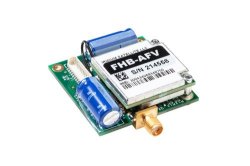
The RockBLOCK 9603 satellite modem uses the Iridium SBD data service.
The RockBLOCK 9603 has a latency of 20-60 seconds and is only able to send 1 message per 30 second period (or greater). This period is
configurable via the RCK_PERIOD parameter.
Note
Any modem using the Iridium 9602 or 9603 chipset should work, though only the RockBLOCK 9603N modem has been tested.
Vehicle Setup
Connect the RockBLOCK modem to a spare UART on the flight controller. Only the +5V, RX, TX and GND lines need to be connected
Ensure the modem is activated in your RockBLOCK account
Copy the Ardupilot RockBLOCK Lua script to the flight controller’s SD card.
Ensure LUA Scripts are enabled and the RockBLOCK UART is set as a scripting UART (
SERIALx_PROTOCOL=28). Reboot the autopilot.
Ground Setup
The RockBLOCK messages are sent and received via the Rock7 gateway. It has an API that allows for sending and receiving messages via a web service.
The Rockblock2MAV software is a companion to the RockBlock Lua script. Use this software on the GCS to send and receive MAVLink messages from the RockBLOCK modem via the Rock7 gateway.
See the Rockblock2MAV documentation for installation and usage instructions.
Usage
Enable High Latency mode on the flight controller to start RockBLOCK mailbox checks.
The RockBLOCK will do a mailbox check every
RCK_PERIODseconds. It will send one HIGH_LATENCY2 message and receive one message from the GCS at this time.Disable High Latency mode on the flight controller to stop RockBLOCK mailbox checks.
Data Costs
Compared to terrestrial services (such as 4G Cellular), the RockBLOCK data costs are expensive.
Current data costs are available from the RockBlock website.
1 RockBLOCK credit is used per MAVLink message. So, for example, if the RockBLOCK
was configured to send 1 HIGH_LATENCY2 message every 30 seconds that would give a data usage of
120 credits per hour. If any commands are sent from the GCS to the vehicle via the RockBLOCK, they should be added too.
For example, if 5 commands are sent in the same hour, 5 credits are used. Combining both sent and received messages,
a total of 125 credits per hours are used.
Parameters
The following parameters are available to control the script:
Name |
Description |
|---|---|
RCK_FORCEHL |
Mode of operation. 0 = start disabled, 1 = start enabled, 2 = enabled on loss of telemetry |
RCK_PERIOD |
When in High Latency mode, send RockBLOCK updates every RCK_PERIOD seconds |
RCK_DEBUG |
Sends RockBLOCK debug text to GCS via statustexts |
RCK_ENABLE |
Enables the modem transmission |
RCK_TIMEOUT |
When RCK_FORCEHL=2, the number of seconds of no telemetry until High Latency mode is enabled |