• Home
    • Copter
    • Plane
    • Rover
    • Blimp
    • Sub
    • AntennaTracker
    • Mission Planner
    • APM Planner 2
    • MAVProxy
    • Companion Computers
    • Developer
  • Downloads
    • Mission Planner
    • APM Planner 2
    • Advanced User Tools
    • Developer Tools
    • Firmware
  • Community
    • Support Forums
    • Facebook
    • Developer Chat (Discord)
    • Developer Voice (Discord)
    • Contact us
    • Getting involved
    • Commercial Support
    • Development Team
    • UAS Training Centers
  • Stores
  • About
    • News
    • History
    • License
    • Trademark
    • Acknowledgments
    • Wiki Editing Guide
    • Partners Program
  • Offline
Copter Logo
  • Introduction to Copter
  • Choosing an Autopilot
  • Ground Control Stations
  • First Time Setup
  • First Flight and Tuning
  • Traditional Helicopters
  • Mission Planning
  • If A Problem Arises
  • Advanced Configuration
  • Peripheral Hardware
    • ADS-B Receiver
    • Airspeed Sensor
    • AIS (Automatic Identification System)
    • Barometer (external)
    • BlackBox Logger using an AutoPilot
    • Button Inputs
    • Buzzer
    • Cameras & Gimbals
    • Companion Computers
    • Crop Sprayer
    • Display (Onboard)
    • DroneCAN Adapter Node
    • DroneCAN Peripherals
    • ESCs and Motors
    • Ethernet Adapters and Switches
    • External AHRS Systems
    • First Person View Video
    • Fuel Flow and Level Sensors
    • Generators
    • GPS/Compass
      • GPS/Compass
        • AeroAtoms Orbit EVO (UART / DroneCAN)
        • AeroAtoms Orbit Nano X9 / X10
        • AeroAtoms Orbit SAM
        • ARK GPS
        • ARK DAN GPS
        • ARK SAM GPS
        • ARK SAM GPS MINI
        • ARK TESEO GPS
        • Avionics Anonymous GNSS + Compass
        • Avionics Anonymous Compass
        • Beitain BN-220 GPS / BN-880 GPS + Compass Module
        • CUAV Neo v2 Pro DroneCAN GPS
        • CUAV Neo 3 Pro DroneCAN GPS
        • CUAV Neo 3(M9N) GPS
        • CUAV Neo 3X(Water proof) GPS
        • CubePilot Here 2 DroneCAN GPS/Gyro/IMU/Baro
        • Holybro DroneCAN M8/M9 GPS
        • Holybro Micro M9N GPS Module
        • Holybro Micro M10 GPS Module
        • Holybro Nano Ublox M8 5883 GPS Module
        • Holybro M8N (Pixhawk 4) GPS Module
        • Holybro M9N GPS Module (UART)
        • Holybro M9N GPS Module (DroneCAN)
        • Holybro M10 GPS Module
        • Holybro DroneCAN RM3100 Professional Grade Compass
        • MakeFlyEasy POS3 DroneCAN GPS/Compass
        • Matek DroneCAN GNSS M10-L4-3100
        • Matek DroneCAN GNSS M9N-G4-3100
        • Matek DroneCAN AP_Periph GNSS M10-L4-3100
        • Matek SAM-M8Q
        • Matek M8Q-CAN/DroneCAN GPS+Compass+Baro+Airspeed I2C port
        • mRo GPS, GPS+Compass,RTK, and DroneCAN modules
        • mRo Locaton One DroneCAN GPS/Compass
        • Navisys GM-M04B L1/L5 GNSS + Compass
        • Qiotek DroneCAN GNSS M10 QMC5883
        • Qiotek GNSS M10 QMC5883
        • Qiotek DroneCAN RM3100 Compass
        • Teravolt AeroNav-1 GPS
        • Zubax GNSS 2: GNSS + Compass + Barometer
      • RTK GPS
      • Moving Baseline (GPS for Yaw) Capable
      • GPS Type Detection
      • GPS Auto Configuration
      • GPS Driver Options
      • GPS Auto Switch
      • GPS Jamming Mediation
      • Advanced Uses
    • Grippers
    • Joystick or Gamepad
    • Landing Gear/ Retractable Camera Mount
    • LEDs (external)
    • Non-GPS navigation
    • On-Screen Display (OSD)
    • Optical Flow Sensor
    • Parachute
    • Power Modules
    • Power Tether
    • PPM Encoder
    • Precision Landing and Loiter
    • Radio Control Systems
    • Rangefinders (Sonar, Lidar, Depth Cameras)
    • Relay Switch
    • Remote Id (aka Drone Id)
    • RPM Sensor
    • Safety Switch
    • Servos and Actuators
    • Smart Batteries
    • Telemetry Radio
    • Temperature Sensors
    • Video (High Definition)
    • Winch
  • Additional Information
  • User Alerts


Individual Partners SWAG Shop
Copter
  • Peripheral Hardware
  • GPS/Compass (landing page)
  • Navisys GM-M04B L1/L5 GNSS with Compass
  • Edit on GitHub

Navisys GM-M04B L1/L5 GNSS with Compass
../_images/navisys_gm-m04b.png

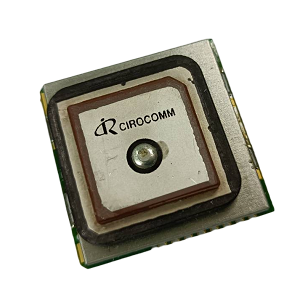
The Navisys GM-M04B is a compact L1/L5 dual-band GNSS smart antenna module based on the Airoha AG3335 chipset, with an integrated Bosch BMM350 compass. It outputs standard NMEA sentences over UART and is used in ArduPilot with the NMEA GPS driver.

Specifications

  • Sensors

    • Airoha AG3335 GNSS (12nm)

      • 135 channels, concurrent L1/L5 dual-band

      • GPS, GLONASS, Galileo, BeiDou, QZSS, NavIC, SBAS

      • Horizontal accuracy 1.5 m CEP (L1+L5)

      • Tracking sensitivity -165 dBm

      • Update rate up to 10 Hz (default 5 Hz)

      • Jamming detection and 12-tone active interference canceller on L1/L5

    • Bosch BMM350 3-axis compass (±2000 μT, I2C)

  • Interface

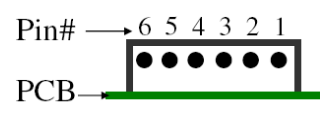
    • 6-pin, 1.0 mm pitch connector (UART TX, ON/OFF control, I2C)

    • UART TTL output, NMEA 0183 (V3.01 / V4.10), 230400 bps by default

  • Power

    • 3.3 ~ 5 V, 56 mA (average tracking)

    • Built-in backup battery

  • Other

    • Built-in L1/L5 patch antenna

    • Fix status LED (blinking: fixed, on: no fix)

    • Fully EMI shielded

    • Operating temperature: -40 ~ 85 °C (battery: -20 ~ 60 °C)

    • Dimensions: 30 x 30 x 11.8 mm

    • Weight: 19.2 g

Pinout

../_images/navisys_gm-m04b_pinout.png

Pin

Name

Function

Type

1

GND

Ground

Power

2

VCC

Power supply (3.3 ~ 5 V)

Power

3

TXD

UART transmit (TTL)

Output

4

ON/OFF

High/floating: on, low: off

Input

5

SCL

I2C clock (compass)

Input

6

SDA

I2C data (compass)

I/O

An optional 30 cm cable (6-pin JST-GH to the module connector) is available for direct connection to the 6-pin GPS2 port of Pixhawk-standard autopilots.

Note

Pin 4 is a power ON/OFF control input, not a UART receive line. The module does not accept commands or RTCM corrections from the autopilot. If pin 4 is connected to the autopilot’s UART TX line, any data sent on that line pulls the pin low, which may switch the module off. The recommended wiring is to leave pin 4 unconnected.

If pin 4 must stay connected (for example when using the standard cable), the autopilot can still transmit on this port in two cases:

  • During GPS detection, ArduPilot sends configuration data. Set GPS_AUTO_CONFIG = 0 to stop this.

  • RTCM correction data received from the ground station is sent to every GPS by default. If another (RTK) GPS is used, set GPS_INJECT_TO to that GPS instance so that corrections are not sent to the GM-M04B.

ArduPilot Configuration

The GM-M04B has been tested on the GPS1 (SERIAL3) and GPS2 (SERIAL4) ports of a Pixhawk 6C. Any free serial port with an I2C bus can be used, as long as the parameters are changed to match.

ArduPilot assigns GPS instances to the serial ports with SERIALx_PROTOCOL = 5 (GPS) in order, starting from the lowest-numbered port, whether or not a GPS is connected to that port. On most Pixhawk-standard autopilots, both SERIAL3 (GPS1 port) and SERIAL4 (GPS2 port) default to 5, so the first GPS instance is always on SERIAL3.

GPS

When connected to the GPS2 port (SERIAL4) as the only GPS, using the optional cable:

  • SERIAL3_PROTOCOL = -1 (None), or any protocol other than 5, so that SERIAL4 becomes the first GPS port

  • SERIAL4_PROTOCOL = 5 (GPS)

  • GPS1_TYPE = 5 (NMEA)

  • GPS_AUTO_CONFIG = 0 (Disabled), recommended if pin 4 is connected (see note above). This parameter applies to all GPS instances.

When connected to the GPS1 port (SERIAL3), keep SERIAL3_PROTOCOL = 5 and set GPS1_TYPE = 5.

If another GPS is connected to a lower-numbered port that also has SERIALx_PROTOCOL = 5 (for example a primary GPS on the GPS1 port), the GM-M04B becomes the second GPS instance: keep SERIAL3_PROTOCOL = 5 and set GPS2_TYPE = 5 instead.

Note

The NMEA driver is not included in the automatic detection of GPSx_TYPE = 1 (AUTO), so the type must be set to 5. The baud rate is detected automatically. The module is used with its factory settings (5 Hz, GGA and RMC output).

Compass

The BMM350 compass is detected automatically on the external I2C bus (ArduPilot 4.6 and later). After connecting, perform a compass calibration with COMPASS_AUTO_ROT enabled so that the orientation of the compass is set automatically. In Navisys testing with the antenna facing up, the detected orientation was COMPASS_ORIENT = 10 (Roll180Yaw90).

More Information

  • Navisys Official Website

Previous Next

Questions, issues, and suggestions about this page can be raised on the forums. Issues and suggestions may be posted on the forums or the Github Issue Tracker.

Creative Commons License© Copyright 2024, ArduPilot Dev Team.