• Home
    • Copter
    • Plane
    • Rover
    • Blimp
    • Sub
    • AntennaTracker
    • Mission Planner
    • APM Planner 2
    • MAVProxy
    • Companion Computers
    • Developer
  • Downloads
    • Mission Planner
    • APM Planner 2
    • Advanced User Tools
    • Developer Tools
    • Firmware
  • Community
    • Support Forums
    • Facebook
    • Developer Chat (Discord)
    • Developer Voice (Discord)
    • Contact us
    • Getting involved
    • Commercial Support
    • Development Team
    • UAS Training Centers
  • Stores
  • About
    • News
    • History
    • License
    • Trademark
    • Acknowledgments
    • Wiki Editing Guide
    • Partners Program
  • Offline
Copter Logo
  • Introduction to Copter
  • Choosing an Autopilot
  • Ground Control Stations
  • First Time Setup
  • First Flight and Tuning
  • Traditional Helicopters
  • Mission Planning
  • If A Problem Arises
  • Advanced Configuration
  • Peripheral Hardware
    • ADS-B Receiver
    • Airspeed Sensor
    • AIS (Automatic Identification System)
    • Barometer (external)
    • BlackBox Logger using an AutoPilot
    • Button Inputs
    • Buzzer
    • Cameras & Gimbals
    • Companion Computers
    • Crop Sprayer
    • Display (Onboard)
    • DroneCAN Adapter Node
    • DroneCAN Peripherals
    • ESCs and Motors
    • Ethernet Adapters and Switches
    • External AHRS Systems
    • First Person View Video
    • Fuel Flow and Level Sensors
    • Generators
    • GPS/Compass
      • GPS/Compass
      • RTK GPS
        • AeroAtoms Orbit Base
        • AeroAtoms Orbit Nano RTK (UART / DroneCAN)
        • ArduSimple RTK GPS simpleRTK2B Budget (u-blox ZED-F9P)
        • ArduSimple RTK GPS simpleRTK3B Pro (Septentrio Mosaic-X5)
        • ArduSimple RTK GPS simpleRTK3B Compass (Unicore UM982, Dual antenna heading)
        • ArduSimple RTK GPS simpleRTK 4 Optimum (u-blox ZED-X20P)
        • ARK MOSAIC-X5 RTK GPS
        • ARK RTK Base
        • ARK RTK F9P
        • ARK RTK GPS L1 L5
        • ARK X20 RTK GPS
        • Blicube RTK GPS (Single Unit Moving Baseline NMEA)
        • CUAV C-RTK 9P RTK Receiver
        • CUAV C-RTK 9Ps RTK Receiver
        • CUAV C-RTK2 PPK and RTK receiver
        • CUAV C-RTK2 HP Heading and RTK receiver
        • DATAGNSS H10P RTK/Compass Receiver
        • DATAGNSS GEM1305 RTK Receiver
        • DATAGNSS NANO RTK Receiver
        • Emlid Reach RTK Receiver
        • CubePilot HERE 3/3+ DroneCAN RTK GPS/IMU/Compass
        • CubePilot HERE 4 DroneCAN RTK GPS/IMU/Compass (see note below)
        • CubePilot Here+ RTK Base/Rover Receiver
        • CubePilot HEREPRO DroneCAN F9P RTK GPS/Compass
        • Freefly RTK GPS Ground Station
        • Foxteck AEROFOX F9P-RTK
        • GNSS.Store UM980 ultraLight RTK GNSS Smart Antenna
        • GNSS.Store ZED-X20P ultraLight RTK GNSS Smart Antenna
        • GNSS.Store mosaic-X5 ultraLight RTK GNSS Smart Antenna
        • GNSS.Store mosaic-g5 ultraLight RTK GNSS Smart Antenna
        • Hitec PositionPro GNSS
        • Holybro DroneCAN H-RTK F9P Rover
        • Holybro DroneCAN H-RTK F9P Helical
        • Holybro RTK F9P Family
        • Holybro RTK M8P
        • Holybro RTK F9P Ultralight
        • Holybro RTK ZED-F9P Rover (RM3100 Compass, Barometer, IP66 Waterproof)
        • Holybro RTK NEO-F9P Family
        • Holybro RTK Unicore UM982 GPS (Dual Antenna Heading)
        • Holybro RTK mosaic-H GPS (Dual Antenna Heading)
        • LOCOSYS HAWK R1 RTK GNSS / R2 RTK GNSS + Compass
        • Navisys GR-901U ZED-F9P RTK base for Ground Station
        • Navisys GE-920 Dual-Antenna RTK
        • Qiotek DroneCAN RTK-F9P GPS
        • Swift Navigation's Piksi Multi RTK GPS Receiver
        • Septentrio AsteRx-m UAS RTK GPS
        • Synerx MDU-2000 RTK + LTE GPS
        • Trimble BD930 RTK GNSS
        • Trimble PX-1 RTX GNSS+INS
      • Moving Baseline (GPS for Yaw) Capable
      • GPS Type Detection
      • GPS Auto Configuration
      • GPS Driver Options
      • GPS Auto Switch
      • GPS Jamming Mediation
      • Advanced Uses
    • Grippers
    • Joystick or Gamepad
    • Landing Gear/ Retractable Camera Mount
    • LEDs (external)
    • Non-GPS navigation
    • On-Screen Display (OSD)
    • Optical Flow Sensor
    • Parachute
    • Power Modules
    • Power Tether
    • PPM Encoder
    • Precision Landing and Loiter
    • Radio Control Systems
    • Rangefinders (Sonar, Lidar, Depth Cameras)
    • Relay Switch
    • Remote Id (aka Drone Id)
    • RPM Sensor
    • Safety Switch
    • Servos and Actuators
    • Smart Batteries
    • Telemetry Radio
    • Temperature Sensors
    • Video (High Definition)
    • Winch
  • Additional Information
  • User Alerts


Individual Partners SWAG Shop
Copter
  • Peripheral Hardware
  • GPS/Compass (landing page)
  • Navisys GE-920 Dual-Antenna RTK
  • Edit on GitHub

Navisys GE-920 Dual-Antenna RTK
../_images/navisys_ge920.png

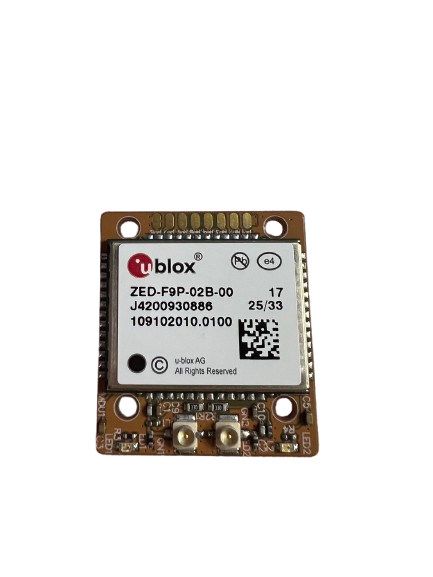
The Navisys GE-920 is a dual-antenna GNSS module based on the u-blox ZED-F9 RTK engine. It operates simultaneously as an RTK moving base and RTK rover to provide centimeter-level positioning and precise heading without relying on vehicle movement.

Key Features

  • Dual Antenna & Heading: Integrated u-blox ZED-F9 RTK engine supporting dual I-PEX antenna connectors (Rover & Moving Base) for accurate orientation.

  • Multi-Constellation Dual-Band: Concurrent L1/L2 reception for GPS, GLONASS, Galileo, BeiDou, QZSS, and SBAS.

  • Centimeter-Level Accuracy: RTK positioning (0.01 m CEP + 1 ppm) and heading accuracy (<0.4°).

  • Communication Interface: Dual UART/TTL interfaces (Rover UART and Moving Base UART) at 460800 bps.

  • Compact Form Factor: 27 x 24 x 6 mm SMD module.

Pinout & Connection Guide
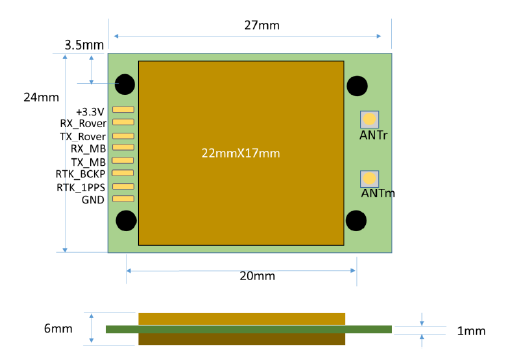
../_images/navisys_ge920_pinout.png

Pin

Name

Function

Type

1

+3.3V

3.3V Power Supply (3.3V ± 0.3V)

Input

2

RX_Rover

UART Receive for Rover

Input

3

TX_Rover

UART Transmit for Rover (Outputs RELPOSNED by default)

Output

4

RX_MB

UART Receive for Moving Base

Input

5

TX_MB

UART Transmit for Moving Base

Output

6

RTK_BCKP

Backup Power (V_BAT: 3V)

Input

7

RTK_1PPS

Time Pulse Signal (1PPS)

Output

8

GND

Ground

Input

Note

Antenna connections: ANTm is for Moving Base and ANTr is for Rover. Heading is defined as the direction vector from ANTm to ANTr.

ArduPilot Configuration

The GE-920 is used in ArduPilot as a Moving Baseline GPS (see GPS for Yaw (aka Moving Baseline)). Connect the Moving Base UART (pins 4/5) to the autopilot’s SERIAL3 port and the Rover UART (pins 2/3) to SERIAL4. Any free serial ports can be used, as long as the parameters below are changed to match. Then set the following parameters:

GPS Driver Settings

  • SERIAL3_PROTOCOL = 5 (GPS), Moving Base UART

  • SERIAL4_PROTOCOL = 5 (GPS), Rover UART

  • GPS1_TYPE = 17 (Moving Baseline Base)

  • GPS2_TYPE = 18 (Moving Baseline Rover)

  • GPS_AUTO_CONFIG = 1

  • GPS_AUTO_SWITCH = 1 (do not use 2 (Blend) with Moving Baseline)

Dual Antenna Yaw Settings

  • AHRS_EKF_TYPE = 3 (EKF3)

  • EK3_SRC1_YAW = 2 (GPS) or 3 (GPS with Compass Fallback)

  • GPS1_POS_X, GPS1_POS_Y, GPS1_POS_Z: offset of ANTm (Moving Base) from the vehicle’s CG.

  • GPS2_POS_X, GPS2_POS_Y, GPS2_POS_Z: offset of ANTr (Rover) from the vehicle’s CG.

See Sensor Position Offset Compensation for how to measure these offsets. If the reported heading is reversed, the position offsets are probably set incorrectly.

Where to Buy

  • For more details, visit the Navisys Official Website.

Previous Next

Questions, issues, and suggestions about this page can be raised on the forums. Issues and suggestions may be posted on the forums or the Github Issue Tracker.

Creative Commons License© Copyright 2024, ArduPilot Dev Team.