Release Procedures
ArduPilot is very reliable because bug fixes are prioritised over new features and releases are performed carefully and only after sufficient testing has been completed.
This page outlines the steps that are normally followed for a new release. Listed mostly as a reference so that we don’t forget the steps.
Alpha Testing
The AutoTester runs after each commit and highlights issues that it has been setup to test.
Developers and some Alpha testers perform intermittent tests of master especially after new features have been added.
Releasing Beta Versions / Release Candidates
Beta Testing / Release candidates are made available to beta testers through the mission planner’s “Beta firmwares” link. The Mission Planner “Beta firmware” link pulls the firmware from the beta directories of firmware.ardupilot.org.
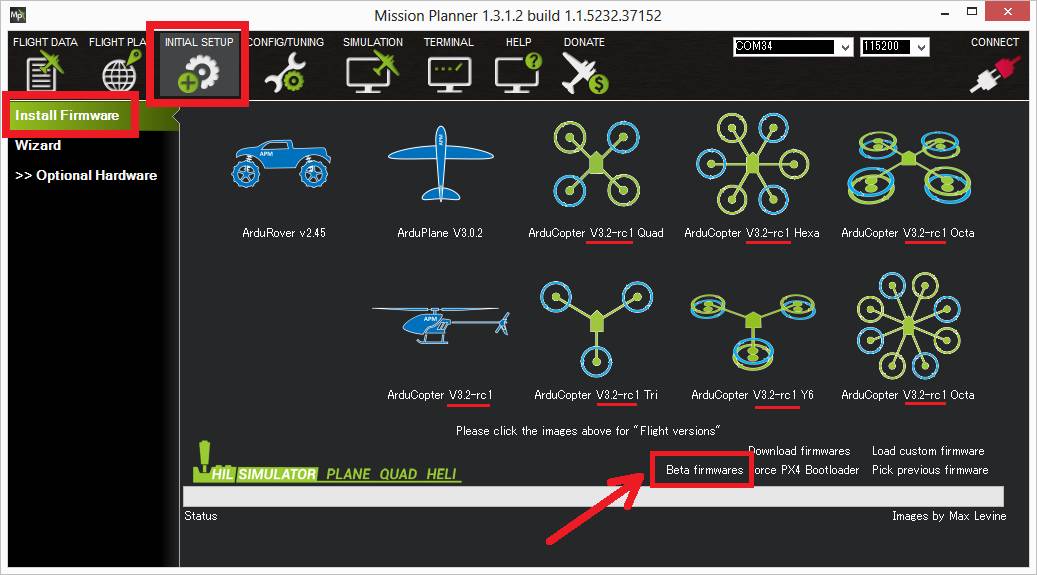
Someone with ardupilot GitHub commit access (normally Randy) makes the new firmware available through the following steps:
For major releases create a new branch
Open a Git Bash terminal in the ardupilot repository.
For major releases (e.g 4.6 to 4.7) create a new branch in the ardupilot repository based on master:
git checkout -b ArduPilot-4.7(“ArduPilot-4.7” should be replaced with the correct major version number)git pushto create the new directory in the ardupilot repoOn GitHub ensure the new branch is protected under the Branch protection rules
On the GitHub projects page, push the “New Project” button and create a new “4.x Backports” project. This is used to track features to be included in this release
Create a new GitHub issue for issue tracking (e.g. ArduPilot 4.7 Issues list)
Create a Release Pull Request
In your local repo, create a new branch based on the upstream release branch:
git checkout upstream/ArduPilot-4.7(“ArduPilot-4.7” should be replaced with the correct major version number)
git checkout -b ap-470-xxxto create a new branch for the release PR
Check the Backports Projects to determine which PRs should be included in this release. For example the 4.7 Backports “pending” column holds the list of PRs that should be included in the next ArduPilot-4.7 release.
Create a new column in the project for this release (e.g. 4.7.1-beta1)
use
gitk upstream/masterto cherry-pick in each PR’s commits from master
As PRs are included in the new branch, move the PR from the “No Status” or “Pending” column of the project to the column for this release
Update version, release notes and tags
update the THISFIRMWARE and FIRMWARE_VERSION definitions in version.h
update ReleaseNotes.txt for each vehicle
Create the PR and gather signatures from other developers
Merge the PR
Check the firmwares have been updated
Wait 8hrs to 24hrs for the binaries to be built. Check the “Build Dates” have updated on these links:
In case the firmwares have not updated it may help to check these links:
Finally open Mission Planner’s Setup / Install Firmware page, push the “Beta firmwares” link and check the versions displayed under each icon are correct.
Announce the release to the beta testers
Let Beta testers know the new version is available by posting on discuss and facebook
Discuss’s Plane category (create a new category if required)
Discuss’s Copter category (create a new category if required)
Discuss’s Rover category (create a new category if required)
Discuss’s Sub category (create a new category if required)
Discuss’s AntennaTracker category (create a new category if required)
ArduPilot facebook group. Include the contents of the ReleaseNotes.txt so people know what has changed and a video if possible
Issue Tracking
Beta testers should report issues in the appropriate category mentioned above (e.g. Discuss Copter-4.7 forum)
The release manager, with help from other developers, should investigate issues, identify developers to tackle them and keep the beta testers updated on progress
User reports should be tracked in the release’s GitHub issue (e.g. ArduPilot 4.7 Issues list)
Releasing Stable Versions
Stable releases are done after weeks or months of beta testing and normally only after two weeks have passed with no unexplained crashes.
The go-no-go decision on a stable release is discussed on the preceding weekly development call. This discussion normally includes a review of the outstanding issues.
Releasing a stable version is the same as a beta version except these tags are updated:
Update Stable tags for Plane
git tag -d ArduPlane-stablegit push origin :refs/tags/ArduPlane-stablegit tag ArduPlane-stable HEADgit push origin ArduPlane-stable
Update Stable tags for Copter and TradHeli:
git tag -d ArduCopter-stablegit tag -d ArduCopter-stable-heligit push origin :refs/tags/ArduCopter-stablegit push origin :refs/tags/ArduCopter-stable-heligit tag ArduCopter-stable HEADgit tag ArduCopter-stable-heli HEADgit push origin ArduCopter-stablegit push origin ArduCopter-stable-heli
Update Stable tags for Rover
git tag -d APMrover2-stablegit push origin :refs/tags/APMrover2-stablegit tag APMrover2-stable HEADgit push origin APMrover2-stable
Update Stable tags for Sub
git tag -d ArduSub-stablegit push origin :refs/tags/ArduSub-stablegit tag ArduSub-stable HEADgit push origin ArduSub-stable
Update Stable tags for AntennaTracker
git tag -d AntennaTracker-stablegit push origin :refs/tags/AntennaTracker-stablegit tag AntennaTracker-stable HEADgit push origin AntennaTracker-stable
Update Stable tags for Periph
git tag -d AP_Periph-stablegit push origin :refs/tags/AP_Periph-stablegit tag AP_Periph-stable HEADgit push origin AP_Periph-stable
An additional tag is created for each vehicle that includes the patch release number
git tag Plane-4.7.0git push origin Plane-4.7.0git tag Copter-4.7.0git push origin Copter-4.7.0git tag Rover-4.7.0git push origin Rover-4.7.0git tag Sub-4.7.0git push origin Sub-4.7.0git tag Tracker-4.7.0git push origin Tracker-4.7.0git tag AP_Periph-4.7.0git push origin AP_Periph-4.7.0
Announcements are done in much the same way as beta releases by posting on these sites:
ArduPilot facebook group. Include the contents of the ReleaseNotes.txt so people know what has changed and a video if possible
On Github, Draft a new release and add the Discuss link from above
Mission Planner will also show a pop-up informing users that a new version is available.
Didn’t find what you are looking for?
If you think of something that should be added to this site, please open an issue or post a comment on the ArduPilot Discord Chat.