How Offline Copies Work
Tip
To download a wiki, go to the Offline Copies page. This page explains how that works rather than providing the controls for it.
The wiki can be read with no internet connection, and is noticeably faster to browse even when you have one. This page explains the feature for readers and, later, how it is built.
While automatic updates are enabled and a wiki page is open, a saved copy can check for updates and download only the files that have changed. You can turn automatic updates off or check for updates manually on the Offline Copies page.
Note
For readers: use the Offline Copies page to save or export documentation. For developers: implementation details begin at Implementation.
Features
Three distinct things are provided here. They do different jobs, and which one you want depends on what you are trying to achieve.
Browse faster. Every page you visit is stored on your device and served from there the next time it is requested. It starts when you turn offline mode on, with the switch at the top of the Offline page or by saving a wiki, and works from then on. This applies to ordinary browsing over a normal internet connection.
Save a wiki for offline use. Saving downloads the wiki you select into your browser, together with the shared image set used by all wikis. The shared images are needed whichever wiki you choose and make up most of the first download: roughly 440 MB of images, plus about 75 MB for Copter. Once saving finishes, every page in that wiki opens without a connection.
Saving is a deliberate choice rather than something that happens automatically. Someone reading a single page should not receive several hundred megabytes of documentation uninvited. If you use the documentation regularly, saving the wiki you work on is also the fastest way to read it.
Export a portable HTML file. Export produces one .html file containing
the pages, images, and a full-text search index. Open it by double-clicking it:
there is nothing to install, and it runs from a USB stick. Use this for a
machine where you cannot install software, or to give documentation to someone
else.
The browser builds the file from the wiki already saved on your device. If you export a wiki that is not yet saved, the browser downloads it first; you then have both an offline copy in the browser and the portable file. Exporting a wiki that is already saved needs no connection.
Getting the Most Out of It
Save the wiki for the vehicle you actually work on. The shared images make up most of the download and are required regardless, so the first save is the large one. A second wiki after that costs only its own pages, which is tens of megabytes rather than hundreds.
Saving needs an internet connection, so save the wiki before you need it rather than when you arrive.
Installing the site as an app downloads nothing by itself. It gives the wiki a separate window and launcher icon. Depending on your browser, it may also help retain saved data when the device runs short of space.
Note
A saved wiki checks for changes only while the Offline Copies page itself is open, since the update timer lives on that page. It fetches only files that have changed. You can turn the check off or run it on demand there.
Warning
A saved wiki lives in your browser’s storage for this site. Clearing site data removes it, and you will need to download it again.
Speed
The wiki gets faster the more of it you have already read, because pages and the assets they share are stored on the device as you go. None of this requires saving a wiki, and it happens on its own.
The table below compares the same page as the wiki behaved before this feature existed, on a first visit with it, and on every visit afterwards.
Before |
After |
Difference |
||
|---|---|---|---|---|
New page |
Read again |
|||
Time to get the page |
about 1,000 ms |
about 1,000 ms |
13 to 19 ms |
60x faster |
Bytes fetched |
about 156 KB |
about 156 KB |
about 25 KB |
6x less |
Requests made |
21 to 26 |
21 to 26 |
about 1 |
26x fewer |
Parameter list (6.1 MB) |
about 8,300 ms |
about 8,300 ms |
about 2,300 ms |
3.5x faster |
The table assumes offline mode is on and you have opened some page of the wiki
before, which is the situation every opted-in reader is in. The service worker
is about 7 KB compressed and is fetched once, when offline mode is first
enabled; pwa.js, which registers it, is another 7 KB compressed, loaded on
every page and cached like any other shared asset. Charging those to every new
page would describe a first-ever visit rather than an ordinary one. Excluded, a
page you have not read costs exactly what it cost before the feature existed.
It is free until it starts paying, which it does the second time you open
anything. A reader who never enables offline mode is not in the table at all:
their pages cost what they always did.
The request row says “about one” rather than none because a stored page is returned immediately and the worker then asks the server whether it has changed. You wait for nothing, but the request is real and the server sees it.
The parameter list is the one page where the saving is not mostly about the
network. It is 6.1 MB and contains roughly 210,000 elements, and the browser
spends about six of its eight seconds laying the page out rather than fetching
it. The content-visibility rule these pages carry reduces that work by
about a factor of three, which is where most of the improvement comes from. It
remains a two second page, and caching will not change that, because the cost
is the size of the document itself. Unlike the rows above it, this row is not
offline mode’s doing: the rule ships in the theme and reaches every reader,
opted in or not.
The reduction in bytes is worth explaining. Of the resources a page pulls in, twelve are shared assets totalling 131 KB and are identical on every page of the wiki, so they are fetched only once. After that a page costs its own HTML and its own images and nothing else, which is why the wiki gets faster as you read rather than staying the same.
With no connection at all, pages you have already visited still open, and a saved wiki opens completely.
Implementation
Everything below this point describes how the feature is built, and is aimed at anyone changing it or reviewing changes to it. It is not needed in order to use the wiki offline.
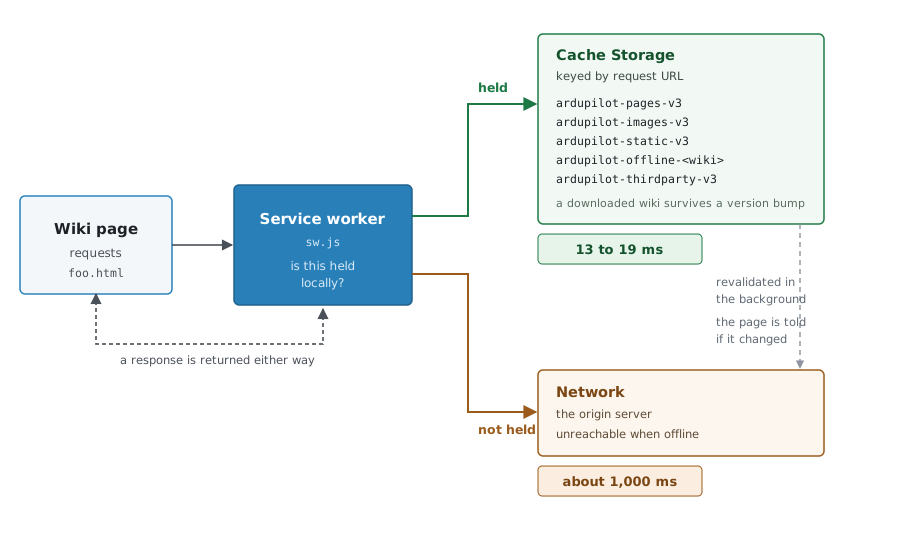
How the service worker answers a request for a page.
The Service Worker
A service worker is a script the browser runs in the background, independently of any page and persisting after the page that registered it closes. Once active it sits between the pages in its scope and the network: every request those pages make is passed to it, and it answers either from local storage or by forwarding the request onward.
That interception is the whole mechanism. The pages are unmodified static HTML as built by Sphinx; nothing is rewritten and no framework is introduced.
Implementation is in frontend/sw.js, registered by frontend/js/pwa.js,
which the theme includes on every page (layout.html carries the manifest
link and the script tag; z_top_menu.html carries the Offline menu entry). Inclusion is
not registration: pwa.js registers the worker only after the reader has
opted in, with the switch at the top of the Offline page or by saving a wiki;
turning the switch off unregisters it. A reader who never opts in gets no
worker and browses the wiki
exactly as before the feature existed, which is what allows it to be deployed
dormant and tested in production without touching anyone else.
Note
Service workers require a secure context: https://, or
http://localhost for development. A wiki served over plain HTTP has no
offline support at all.
Storage
Cache Storage holds complete HTTP responses keyed by request URL, in named stores. It is separate from the browser’s HTTP cache, is not cleared with browsing history, and is scoped to the origin.
ardupilot-pages-<version>,-images-<version>,-static-<version>Populated while browsing. Discarded when
CACHE_VERSION(declared once, at the top ofsw.js) changes.ardupilot-offline-<wiki>A saved wiki. Excluded from version-bump deletion, since it holds content the reader chose to store.
ardupilot-thirdparty-<version>Cross-origin assets, so they are not re-fetched on every page.
heldOffline() in sw.js decides whether a URL is held. It serves every
resource type, and tries each form a URL may have been stored under, including
the /_common/ path used for images shared between wikis.
Note
Stored keys are the URLs the site serves. ArduPilot serves
/copter/docs/foo.html directly. A host that canonicalises URLs, by
stripping .html for instance, breaks offline reading while leaving
online browsing unaffected, which makes it a difficult fault to attribute.
Why Browsing Is Fast
Four things account for most of it.
Content held locally is preferred over the network. A page that is stored is returned immediately and revalidated in the background, and if the copy that comes back differs, the page is told and offers you a reload.
Lookups are directed rather than exhaustive. Calling caches.match() without
naming a store searches every store in turn, and a reader who has saved every
wiki has fourteen of them. Since the URL identifies the single store that could
hold it, the worker looks only there, which takes 89 ms against 692 ms for the
same request. The exhaustive search is kept as a fallback.
Content found in a saved wiki is copied into the runtime store the first time it is used, so later requests for it resolve directly. This takes 1 ms against 84 ms.
Assets carrying a fingerprint are served from storage without checking the
network. Sphinx stamps them, as in theme.css?v=5d32c60e, so a stored copy
can only be the copy that the fingerprint names.
That last point is also why the wiki costs the server less to serve. Of the 21 to 26 resources a page pulls in, twelve are shared assets totalling 131 KB and are byte-identical on every page. Once they are held they are never requested again, so the second page and every page after it costs its own HTML plus its own images: a median of 25 KB against about 156 KB. This applies to every reader from their second page onwards, whether or not they ever save a wiki.
Prefetching
Once offline mode is on, pwa.js fetches a page shortly before it is likely
to be wanted, judging from the pointer’s position, its velocity projected
forward, and whether it is slowing down as it approaches a link. A pointer
crossing a link at speed triggers nothing, and a reader who has not opted in
gets no speculative traffic at all.
Speculative traffic is deliberately bounded. At most five pages are fetched per page view, at least 400 ms apart, with only one request in flight at a time and each URL fetched at most once. Anything larger than 2 MB is abandoned, and requests still in flight are cancelled when you navigate. Pages that are already stored bypass the budget entirely and generate no traffic at all.
Note
Nothing is fetched speculatively if you have asked your browser to reduce data usage. The pointer heuristics also stand down on pages carrying more than 250 links, where links are an index rather than a sign of where you intend to go; the next and previous buttons and a held hover still count, because those are explicit.
Saving a Wiki
Fetching the pages one at a time would be roughly 3,400 requests per reader for Copter alone. Each wiki is packed into an archive at build time instead, and unpacked by the browser.
The panel is split into small files that load together: common_offline_page.js
is the panel itself; common_offline_unpack.js (window.ApUnpack) streams
an archive and unpacks each entry as it arrives rather than buffering the whole
file first; common_offline_update.js (window.ApUpdate) is the
differential update below. Every entry is written to Cache Storage under the URL
the site serves it at, so saved content is retrieved by exactly the same path as
content that was stored while browsing.
The chosen wiki is downloaded before the shared-image archive, not after. A wiki’s own archive holds all of its pages and the images unique to it, so it is readable within seconds; the ~440 MB of shared images backfill afterwards, and until they land a shared image comes from the network when online and is absent offline.
Two constraints apply:
The archives are served with a content coding, so the browser decompresses them before the script sees the body. This avoids relying on
DecompressionStream, which is missing from Safari before 16.4 and Firefox before 113.A completion marker is written last, and a saved wiki only counts as usable once that marker exists, so an interrupted download is never mistaken for a complete one.
Building and Serving
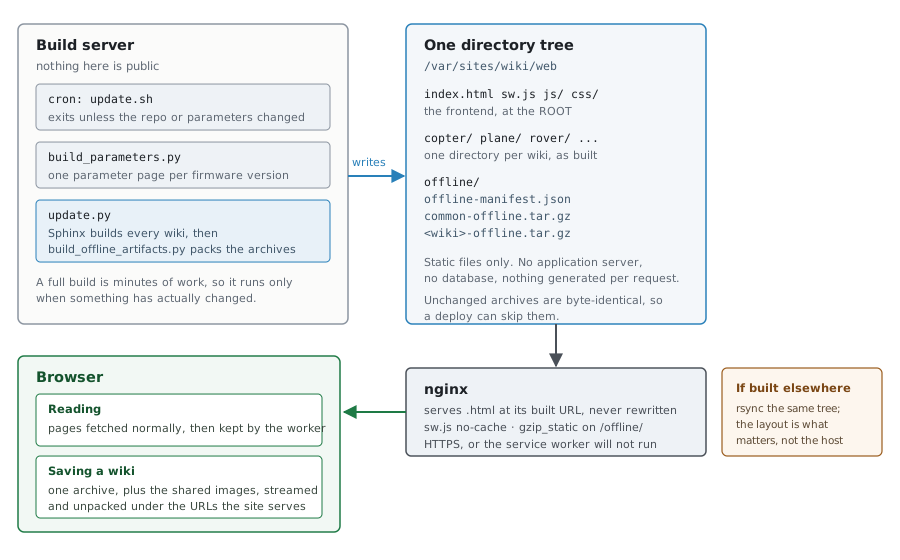
How the archives are built and served.
scripts/build_offline_artifacts.py runs at the end of every full build,
writing into <destdir>/offline/:
offline-manifest.jsonSizes, page counts and a build id. The download page renders from this rather than hardcoding figures.
common-offline.tar.gzImages used by two or more wikis. The majority of the total size, kept separate because including them per wiki would multiply several hundred megabytes across eleven.
The About wiki rides along inside it, keeping its
/ardupilot/...paths. At 3 MB it was too small to be worth a row of its own on the download page, soFOLD_INTO_COMMONinscripts/build_offline_artifacts.pywrites it here instead. The service worker has a matching list, so/ardupilot/requests ask the common cache directly rather than falling through to the exhaustive search.<wiki>-offline.tar.gzContent unique to a single wiki.
<wiki>-files.jsonA table mapping every path in the archive to a hash of its contents. A saved wiki stores this alongside its files; an update compares the stored table with the freshly published one and fetches only what moved, rather than re-downloading the whole archive to correct a typo. Every fetched file is verified against its hash before it is stored, and a full save is marked complete only once the archive’s contents have been checked off against this table, so a build published mid-save cannot be frozen in as current.
offline.cache/Build caches under
<destdir>/offline.cache/: video thumbnails inthumbs/and PNG optimisation results inimages/. With a deployment directory outside the checkout, both surviveupdate.shcleaning the checkout. They are never included in the published archives or promoted withoffline/. Without--destdir, the caches are local to the checkout.PNGs are keyed by their bytes, so unchanged images are not re-encoded even after a clean build. Images that cannot shrink after a successful encode are recorded with small marker files instead of storing another copy. Failed encodes leave no marker and are retried on the next build. Cached PNGs are checked for valid structure and identical pixels before reuse; damaged entries are regenerated. Older empty markers are rechecked once, while valid prebuilt PNGs remain reusable. When Pillow is unavailable, the PNG pass skips scanning and writing its cache altogether.
These are disposable build files, not browser downloads. Deny HTTP access to
/offline.cache/when the deployment directory is a web root (see the nginx example below). Old image versions are retained; to reclaim space, removeoffline.cache/images/while no build is running. The next build recreates it, at the cost of re-encoding the images once.files/The rewritten pages and generated video stills, published individually and gzipped. The archive holds a rewritten copy of each page (the donate button becomes a link, video embeds become stills), so a differential update fetches the changed file from here, where its bytes match the table, rather than from the live site, which serves the original and would fail the hash check.
Archives are reproducible: tar metadata is normalised, so unchanged content produces byte-identical output and a deploy can skip it.
Large images in the archives can be downsized to attack the first-download size:
setting ARDUPILOT_OFFLINE_MAX_IMAGE_DIM to a pixel size (1600 is a good
default) resizes anything larger, in the archive copies only. It is off by
default because a saved image is then what a reader sees online too, which is a
quality decision rather than a silent one.
Requirements
The archives are static files, and no application server or database is involved. The host must meet these requirements:
Pages must be served at their built URLs.
/copter/docs/foo.htmlmust return that page rather than redirecting to/copter/docs/foo.The worker must not be cached.
/sw.jsmust be served withCache-Control: no-cache.The manifest and the file tables must not be cached either. They are how a saved wiki learns a new build exists, so
offline-manifest.jsonand<wiki>-files.jsonare servedno-cache; the archives, whose URLs carry the build id, are cached hard.Compressed files must be paired with their served name. Under nginx,
gzip_static onin the/offline/location serves<name>.tar.gzfor a request to<name>.tar, and<name>.gzfor the loose files underfiles/, setting the content coding so the browser decompresses natively.The frontend must be served from the web root. A service worker’s scope is its own path and everything below it, so a worker placed at
/frontend/sw.jsregisters successfully and then controls no wiki page at all.A directory asked for without its slash must redirect to the slash form:
/planeto/plane/. Serving the index page at/planemakes every relative link on it resolve one level up. The worker does the same redirect when it answers offline.
Under nginx, the rules that matter look like this:
location / {
    if (-d $request_filename) {
        rewrite ^(.*[^/])$ $1/ permanent;
    }
    try_files $uri $uri/ =404;
}
location = /sw.js                              { add_header Cache-Control "no-cache"; }
location ~ ^/(js/pwa\.js|.*/_static/common_offline[^/]*\.(js|css))$ {
    add_header Cache-Control "no-cache";
}
location = /offline/offline-manifest.json      { add_header Cache-Control "no-cache"; }
location ~ ^/offline/[^/]+-files\.json$         { add_header Cache-Control "no-cache"; }
location = /offline.cache                     { return 404; }
location ^~ /offline.cache/                   { return 404; }
location /offline/ {
    gzip_static on;
    gzip off;
    add_header Cache-Control "public, max-age=31536000, immutable";
}
Recovery
This is a worst case, and is described because it is the one failure a reader cannot clear themselves.
A service worker outlives the page that registered it and controls every page in its scope, so a faulty one is not resolved by reloading, by navigating elsewhere on the site, or usually by restarting the browser. A worker serving wrong or stale content will keep doing so.
frontend/sw-kill.js exists for that case. Deployed in place of sw.js,
it is the offline page’s opt-out thrown for every reader by us: on each
device that fetches it, it deletes every ardupilot-* cache, saved wikis
included, tells the open pages to clear the opt-in flag so pwa.js does not
register it again, and unregisters itself. Readers are back to a browser that
never opted in, with nothing left behind. Losing the saved wikis is the point:
the switch is for when this feature has failed, and a reader should not keep
state produced by it. It is a one-line deploy and asks nothing of readers.
This works only if the browser will collect the replacement, which is why
/sw.js must be served no-cache. That header is not a nicety: without
it there is no remote means of recovery.
Testing
npm install
npm test
scripts/tests/test_offline_worker.jsBuilds a cache from real archives, requests the URLs the site serves, and resolves them with the worker’s own code.
scripts/tests/test_offline_page.jsDrives the download panel under jsdom, including the update check.
scripts/tests/test_offline_export.jsRuns the exporter against build output and inspects the result.
scripts/tests/test_offline_archives.pyInspects the finished archives. Requires a full
update.pyfirst.scripts/tests/test_lazy_youtube.pyCovers the Sphinx extension that makes every video embed load lazily.
scripts/tests/test_image_resize.pyCovers the optional archive image downsizing.
Tests exercise the shipped code rather than a reimplementation of it, and each must be shown to fail when the behaviour it covers is removed. A suite that cannot run — jsdom missing, or the archives not built — exits with an error rather than reporting success having checked nothing.
Limitations
The shared image set is about 440 MB and is required whichever wiki is chosen. The wiki itself is readable within seconds because it downloads first, but a shared image is missing offline until the shared set finishes behind it. Downsizing large images (above) reduces this considerably.
The generated reference pages, such as the full parameter lists and the board feature tables, reach several megabytes and hundreds of thousands of elements. Their cost is in rendering rather than transfer, so caching does not help them.
EPUB and PDF output are not covered by this feature.
A saved copy is only checked for updates while a wiki page is open in the browser. Nothing runs in the background once every tab is closed.