Altitude Hold Mode
In altitude hold mode, Copter maintains a consistent altitude while allowing roll, pitch, and yaw to be controlled normally. This page contains important information about using and tuning alt hold.
Overview
When altitude hold mode (aka AltHold) is selected, the throttle is automatically controlled to maintain the current altitude. Roll, Pitch and yaw operate the same as in Stabilize mode meaning that the pilot directly controls the roll and pitch lean angles and the heading.
Automatic altitude hold is a feature of many other flight modes (Loiter, Sport, etc) so the information here pertains to those modes as well.
Note
The autopilot uses a barometer which measures air pressure as the primary means for determining altitude (“Pressure Altitude”) and if the air pressure is changing in your flight area due to extreme weather, the copter will follow the air pressure change rather than actual altitude. When fitted and enabled, a downward facing rangefinder such as LiDAR or SONAR will automatically provide even more accurate altitude maintenance, up to the limit of the sensor.
Controls
The pilot can control the climb or descent rate of the vehicle with the throttle stick.
If the throttle stick is in the middle (40% ~ 60%) the vehicle will maintain the current altitude.
Outside of the mid-throttle deadzone (i.e. below 40% or above 60%) the vehicle will descend or climb depending upon the deflection of the stick. When the stick is completely down the copter will descend at 2.5m/s and if at the very top it will climb by 2.5m/s. These speeds can be adjusted with the PILOT_SPD_UP and PILOT_SPD_DN parameters. The acceleration used to establish these speeds is set by PILOT_ACC_Z.
The size of the deadband can be adjusted with the THR_DZ parameter. This param’s value should be between “0” and “400” with “0” meaning no deadband. “100” would produce a deadband 10% above and below mid throttle (i.e. deadband extends from 40% to 60% throttle stick position).
Copter allows arming and disarming in altitude hold mode. When disarming, the copter may need to rest in the landing position for a few seconds to allow the “landing checker” to verify that the copter has landed before you are able to disarm.
Tuning
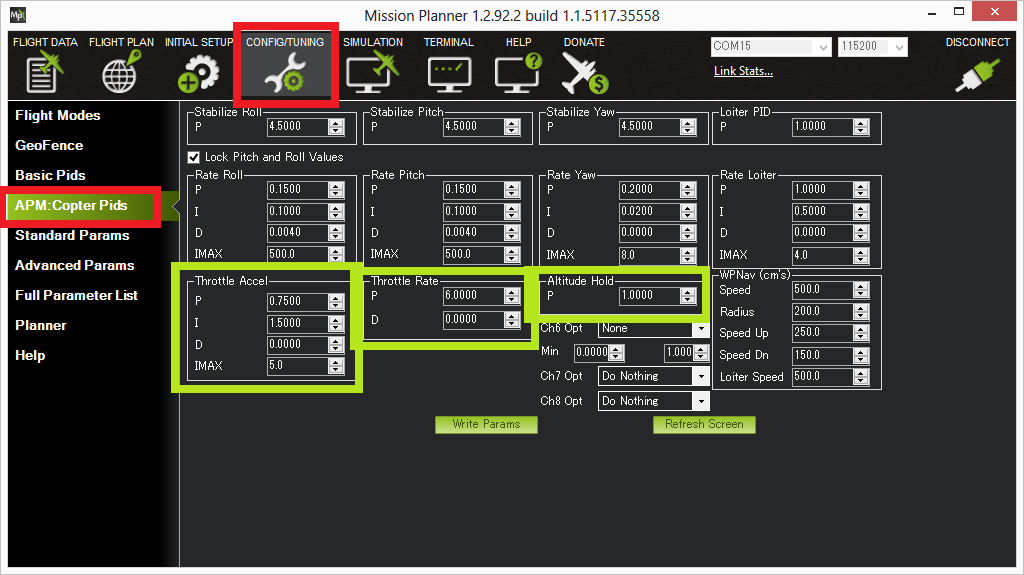
The Altitude Hold mode utilizes a cascaded controller loop consisting of a position controller, a velocity controller, and an acceleration controller:
Position Controller (Altitude Hold P): PSC_D_POS_P converts altitude error (difference between target and estimated altitude) into a desired climb or descent rate. A higher value makes the vehicle attempt to maintain altitude more aggressively, but setting it too high can cause jerky throttle response or vertical oscillations.
Velocity Controller (Throttle Rate P): PSC_D_VEL_P converts the climb or descent rate error into a desired vertical acceleration. This parameter normally does not require tuning.
Acceleration Controller (Throttle Accel PID): Converts vertical acceleration error into motor throttle output using PSC_D_ACC_P, PSC_D_ACC_I, and PSC_D_ACC_D. The output is summed with the feedforward hover throttle (MOT_THST_HOVER) to drive the motor matrix.
Tuning Guidelines:
The 1:2 ratio of P to I (i.e.
PSC_D_ACC_Iis twicePSC_D_ACC_P) should typically be maintained when modifying Throttle Accel gains.During initial tuning, follow the Initial Tuning Flight procedure: set PSC_D_ACC_P to 0.1 × MOT_THST_HOVER and PSC_D_ACC_I to 2 ×
PSC_D_ACC_P(0.2 ×MOT_THST_HOVER). This helps prevent vertical oscillations or bouncing.If the vehicle slowly oscillates up and down in AltHold, reduce both PSC_D_POS_P and PSC_D_VEL_P by 20% to 50%.
In Mission Planner, these parameters can be configured under CONFIG -> Extended Tuning in the Altitude Hold (Alt to climbrate), Throttle Rate (VSpd to accel), and Throttle Accel (Accel to motor) sections, or directly via the Full Parameter List.
Note
In Copter 4.7 and later, vertical position controller parameters use NED naming conventions (PSC_D_POS_P, PSC_D_VEL_P, and PSC_D_ACC_P). In Copter 4.6 and earlier, these were named PSC_POSZ_P, PSC_VELZ_P, and PSC_ACCZ_*. Note that while position and velocity gains were only renamed, the acceleration parameters were rescaled when upgrading from 4.6: P, I, and D gains were rescaled by 0.1 (PSC_D_ACC_P = PSC_ACCZ_P × 0.1, PSC_D_ACC_I = PSC_ACCZ_I × 0.1), while IMAX was rescaled by 0.001 (PSC_D_ACC_IMAX = PSC_ACCZ_IMAX × 0.001).

Verifying AltHold performance with dataflash logs
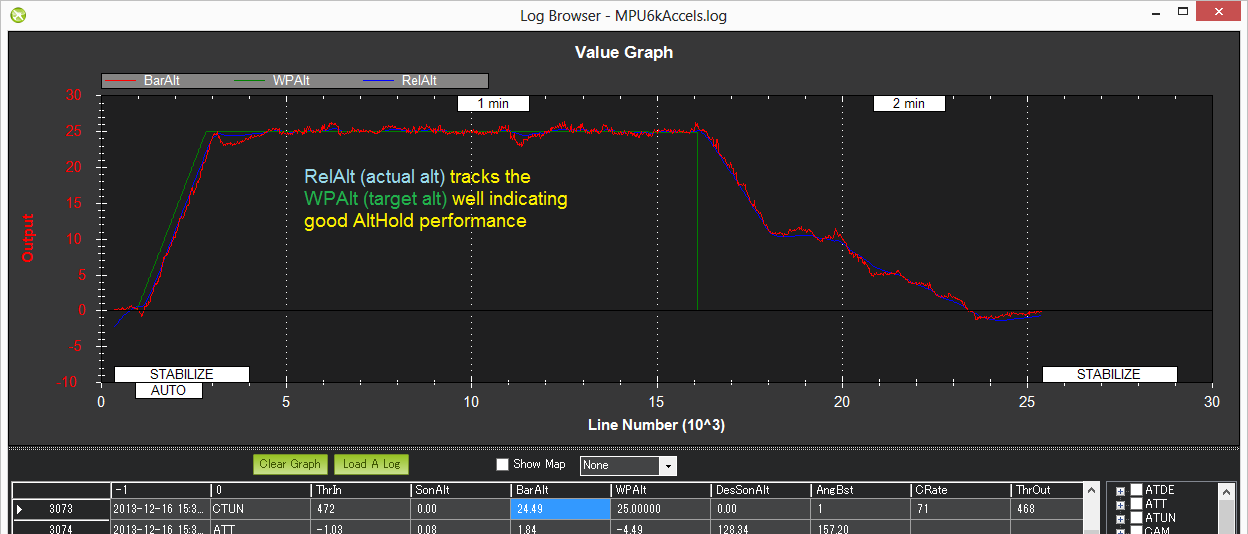
Viewing the altitude hold performance is best done by downloading a dataflash log from your flight, then open it with the mission planner and graph the barometer altitude, desired altitude and inertial navigation based altitude estimate. This data is found in slight different columns depending upon the version and board.
CTUN’s BAlt (baroalt), DAlt (desired alt) and Alt (inertial nav alt estimate)
The three should track well as shown below.
Common Problems
High vibrations can lead to the copter rapidly climbing as soon as altitude hold is engaged. Check the Measuring Vibration and Vibration Dampening wiki pages for details on how to measure and reduce vibrations.
Copter slowly descends or climbs until the pilot retakes control in stabilize. Normally this is caused by not having the throttle stick in the mid position. This commonly happens when the pilot is switching into AltHold from a manual flight mode (like Stabilize) on a copter that does not hover at mid throttle. See the wiki page related to setting the mid throttle position.
The motors seem to stop for a moment just as AltHold is engaged but then it soon recovers. This normally occurs when the pilot enters AltHold while climbing rapidly. The target altitude is set at the moment the pilot switches into alt hold but because the vehicle is rising quickly it flies above the target. The aggressive altitude hold controller then responds by momentarily reducing the motors to near minimum until the copter begins falling back to the target altitude. The workaround is to enter AltHold while the copter is flying at a stable altitude.
Air pressure changes cause the vehicle to drift up or down by a couple of meters over longer period of time or for the altitude shown on the GCS to be inaccurate by a couple of meters including occasional negative altitudes (meaning altitudes below the home altitude).
Momentary altitude loss of 1m ~ 2m when the copter levels out after a high speed forward flight. This is caused by an aerodynamic effect which leads to a momentary low pressure bubble forming on the top of the copter where the autopilot is mounted which leads the altitude hold controller to believe it is climbing so it responds by descending. There is no cure for this behaviour at the moment although increasing the EK2_ALT_M_NSE parameter reduces the effect but increases the change of Common Problem #1 listed above. The EK2_ALT_M_NSE parameter has a range from 0.1 to 10.0 and allows increments of 0.1.
Altitude hold becomes erratic when the vehicle is close to the ground or during landing. This can be caused by the barometer being affected by pressure changes created by prop-wash. The solution is to move the autopilot out of the prop wash effect or shield it within an appropriately ventilated enclosure.
Sudden altitude changes caused by light striking the barometer.
Adequate Power
It is very important that the vehicle has enough power available. Without this the AltHold and attitude controllers can require more power than is available from one or more motors and will be forced to sacrifice some control which could lead to a loss of attitude or altitude.
Ideally the vehicle should be able to hover at about 50% throttle (mid stick) and anything higher than 70% is dangerous.
Warning
If you incorporate expo on your transmitter, that directly increases the size of the Alt Hold throttle dead band.