Multi-Vehicle Flying
This page shows how to monitor and control multiple vehicles using a single ground station. More information can be found on the Follow mode and Mission Planner Swarming pages.
Note
This example has been greatly surpassed by Michael Clement’s 50 plane demonstration
Equipment you will need
Pairs of telemetry radios (e.g. 2x number of vehicles) to allow each vehicle to be connected to the ground station PC and (optionally) a USB HUB increase the number of available USB ports on the PC
OR
Telemetry radios capable of mesh networking (e.g DroneBridge ESP32, RFD900) in which case just 1 radio for each vehicle + 1 for the ground station PC is required
GCS capable of displaying and controlling multiple vehicles (e.g Mission Planner, QGroundControl)
RC transmitter for each vehicle
Pre-Flight Setup
Connect to each vehicle’s autopilot and set its MAV_SYSID to a unique number (e.g. “1” for first vehicle, “2” for second vehicle, etc)
If using SiK radios, set the NetID of each pair of radios to a unique number (e.g. set the first pair’s
NetIDto “23”, the second’s to “24”, etc)For each pair of radios, connect one to a vehicle’s autopilot and the other to the ground station PC
On the GCS, connect to each radio. If using Mission Planner, right-mouse-button-click to the left of the Connect button, select “Connection Options” and select the COM port of each telemetry radio and press “Connect” (more details can be found here)
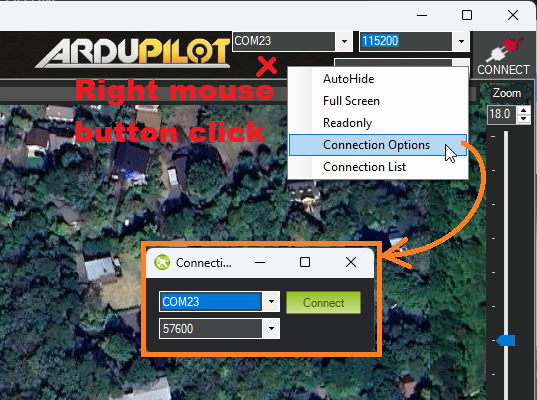
Confirm all vehicles appear on the GCS map
Optionally reduce the telemetry data rate for each vehicle to reduce network traffic
Controlling the vehicles
How each vehicle is controlled depends upon the GCS used but if using Mission Planner, use the connection drop-down to select the vehicle to display and control.
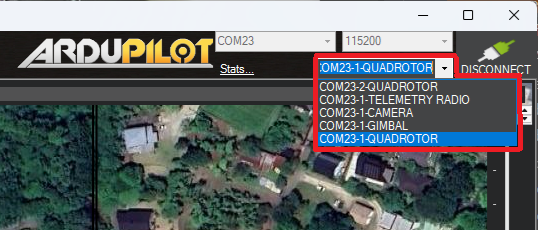
If using Copter
Switch each vehicle into GUIDED mode
Command each vehicle to take-off by right-mouse-button-clicking on the map, select “Takeoff” and input 2m
Each vehicle can be moved by first selecting its connection, then right-mouse-button click on the map and select “Fly to Here”
Change each vehicle’s mode to Land or RTL to end the test
To retake control of a vehicle manually, use the vehicle’s transmitter to change to a manual mode such as AltHold or Loiter