Loweheiser Generator
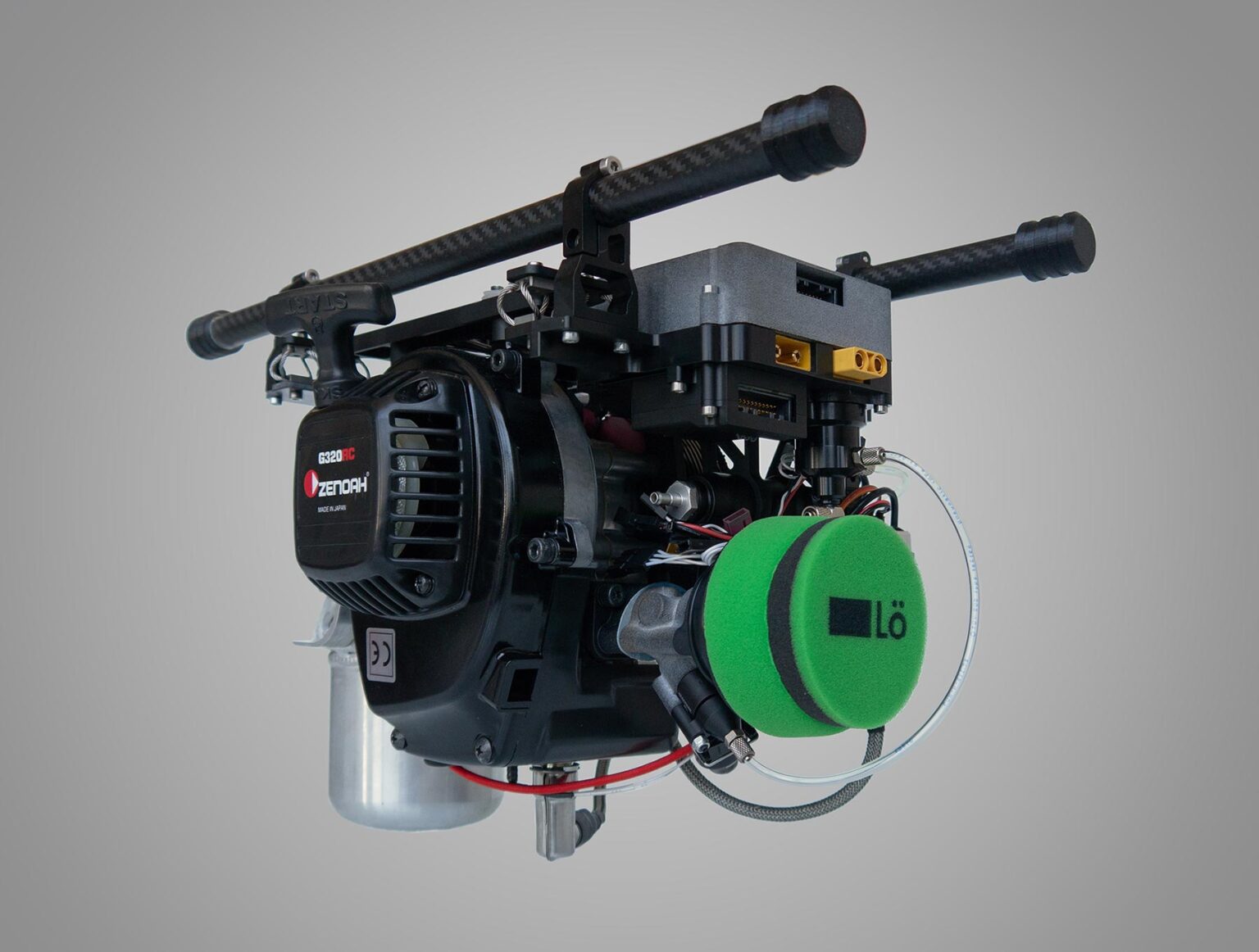
The Loweheiser Hybgen is an electric generator that can be installed into a multirotor drone to extend the flight time. This hybrid powertrain is suitable for drones up to 25 kg MTOM that require long flight times or heavy payloads. It consists of a two-stroke combustion engine of 32cc with a permanent-magnet generator attached to the crankshaft.
Compilation
Note
the driver for this device is not included by default in the firmware built and available on the Firmware Server . Either the user must build his own firmware with this backend enabled or use the Custom Firmware Server
Usage
Parameter configuration
This generator is a serial device. Connect it to a serial port of the flight controller and set the corresponding SERIALx_PROTOCOL=2 (MAVLink). Also set the corresponding MAVx_OPTIONS bit 1 (Don’t forward mavlink to/from).
Set EFI_TYPE = 4 (Loweheiser) and GEN_TYPE = 4 (Loweheiser). Restart the flight controller to load the rest of the generator and EFI parameters.
Configure a 3-position switch on an RC input channel with RCx_OPTION=85 (Generator). This will act as the generator state control switch.
(OPTIONAL) Configure an analog RC input channel (not a switch) with RCy_OPTION=218 (Loweheiser throttle). This will act as manual throttle input for the generator throttle body. It is encouraged to use your throttle stick to drive this input channel.
(OPTIONAL) Configure an switch-type RC input channel with RCz_OPTION=111 (Loweheiser starter). This is a switch that will control the generator starter.
There is no need to configure output channels, as the generator is operated entirely through the serial port.
To monitor the generator performance, configure a battery monitor with BATTx_TYPE=17 (Generator-Elec). To monitor the engine performance, configure a battery monitor with BATTy_TYPE=18 (Generator-Fuel). Set the volume of the fuel in the tank in BATTy_CAPACITY (in mL).
GEN_L_IDLE_TH can be used to adjust the throttle percent that will be sent to the generator throttle body during idling.
GEN_L_IDLE_TH_H can be used to adjust the throttle percent that will be sent to the generator throttle body, during warming up or cooldown.
The following parameters can be used to adjust the temperature limits of the generator:
GEN_L_RUN_TEMP: The cylinder head temperature required for the generator to start producing power, in deg Celsius.
GEN_L_IDLE_TEMP: The cylinder head temperature required for the generator to return to idle after having run.
GEN_L_OVER_TEMP: The cylinder head overheat temperature. Above this threshold a warning message gets sent over MAVLink
Note
The following parameters are not yet supported by the generator manufacturer:
GEN_L_MNT_TIME: Seconds until maintenance is required.
GEN_L_RUNTIME: Total time this generator has run, in seconds.
Controls
The switch configured as Generator has 3 values: STOP, IDLE, RUNNING. Begin on the STOP command. The generator is stopped.
Set the generator switch to IDLE. The goal of the IDLE state is to start the engine and bring it up to temperature.
If you have configured a Loweheiser throttle input channel, you can now use it to select the throttle during IDLE state. Otherwise, GEN_IDLE_TH will be applied.
If you have configured a Loweheiser starter input channel, you can now use it to activate the starter motor and crank the engine. Otherwise, crank the engine manually.
Set the generator switch to RUNNING. The driver will actually wait until the engine reaches a temperature of GEN_RUN_TEMP, before it switches to the RUN state. Until then, it will set the throttle to GEN_IDLE_TH_H.
Once temperature is reached, the generator will proceed to the RUN state. In this state the throttle is controlled automatically by a governor and the generator produces power.
To stop the engine, set the Generator switch to STOP. The driver will actually wait until the engine cools down to a temperature of GEN_IDLE_TEMP before it stops. During that time, it will apply GEN_IDLE_TH_H throttle.
Note
No state transitions will take place once the vehicle is armed.
Note
The Loweheiser driver will apply additional pre-arm checks, to ensure safety of operations.
MAVLink messages
The generator will emit the following MAVLink telemetry messages:
GENERATOR_STATUS
EFI_STATUS
Logging
This driver will add the following messages to the onboard log:
LOEC: Debug information for the driver state machine.
LOEG: Generator telemetry.